
This buying guide helps you choose a plug-in surge protector for equipment such as a computer, monitor, router, or TV. Start with the devices you plan to connect, the location of the wall outlet, and the differences between extra outlets, surge protection, and backup power.
How to choose the right kind of protection
A power strip adds outlets. Look for a surge protective device evaluated to UL 1449 if you want equipment protection against brief voltage spikes. A lighted power switch tells you the strip has power. Look separately for a protection-status indicator and read the manual to learn what it means when that light goes out. Some products continue supplying power after protection is lost. Check the exact model’s listing and documentation before relying on it. See UL Solutions’ guide to power strips and surge protectors for the differences.
For a desktop computer that needs enough time to save work during an outage, look for an uninterruptible power supply (UPS) sized for the load and desired runtime. A plug-in protector provides no battery backup. For equipment on multiple circuits or connected to a dedicated appliance outlet, discuss whole-home protection and equipment-specific requirements with a qualified electrician. Surge protection has limits, especially during a direct lightning strike.
Check which outlets have battery backup
For a desk that needs backup power, look at the UPS manufacturer’s runtime chart at the combined wattage of the equipment you want to keep running. Check which outlets are backed by the battery. On units with both outlet types, a monitor on a surge-only outlet can go dark even while the computer keeps running. Schneider Electric’s Back-UPS outlet guidance explains how to distinguish the two.
What to look for on the label and in the manual
| Criterion | Why it matters | What to verify |
|---|---|---|
| Surge certification | Identifies a device evaluated for surge protection | Verify the exact model and its UL 1449 listing or certification by a recognized testing laboratory. |
| Voltage protection rating | Indicates the voltage measured under a standardized surge test | Compare ratings for equivalent protection modes and test conditions. Use joules as supplementary information. |
| Electrical load rating | Sets the maximum permissible connected load | Check equipment input ratings against the device’s marked limits. Follow any restrictions in the manuals. |
| Outlet layout and cord | Determine whether the setup works in the available space | Measure cord routing and account for wide adapters, plug orientation, and access to the switch. |
| Protection indicator | Helps you identify when the device needs replacement | Confirm how protection loss is signaled and whether outlets remain energized afterward. |
Match the protector to your setup
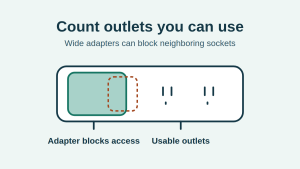
For a home office, map the computer, monitor, and router plugs before ordering. A sideways wall adapter can block the next outlet, so count usable positions instead of relying on the advertised number. Choose a cord that reaches a grounded wall outlet directly and stays visible and clear of walkways. Check the ratings of the connected devices together. Browse Benzafind’s Surge Protectors section for examples of different outlet arrangements and sizes.
For a TV cabinet, check whether the wall plug and cord can fit behind the furniture without being pinched. Then plan which outlets can actually take wide adapters. For a workshop, garage, or outdoor location, check the specific environmental rating on the device. A covered location alone does not establish suitability for damp or outdoor use. Follow the manuals for both the protector and the connected equipment, and keep heaters and other equipment that requires a direct wall connection off the strip.
Read protection ratings in context
When comparing protection claims, look for a published voltage protection rating (VPR) measured under UL 1449. A lower VPR indicates a lower measured voltage in the same test and protection mode. It cannot predict the result of every real-world surge. The joule figure is a different rating, so use it as supporting information rather than a stand-alone measure of protection. Keep the status light visible and follow the replacement instructions if it indicates loss of protection.
Common buying mistakes
- Judging protection by outlet count, USB ports, or a single large joule number.
- Plugging one strip into another or adding an extension cord to reach the wall.
- Using a strip for a space heater or other high-draw appliance that the equipment instructions require you to plug directly into the wall.
- Assuming the power light confirms surge protection or waiting for the outlets to fail before replacing a unit whose protection indicator shows a fault.
Checklist before you buy
- Decide whether you need surge protection, battery backup, or an electrician’s advice.
- Verify the exact model’s certification and electrical rating.
- Measure the cord path and test the planned spacing using the plugs you own.
- Identify a grounded outlet and an accessible place for the unit.
- Read the protection indicator and replacement instructions.